

ZipQuantum Engineering ·
WordPress Smart Links & QR Codes: A Practical Content-to-Campaign Workflow
Turn WordPress and WooCommerce content into managed Smart Links and downloadable QR codes with a workflow that prevents stale URLs and broken campaigns.
Most content teams do not have a link-generation problem. They have a source-of-truth problem.
A post is published in WordPress. A campaign URL is created in a spreadsheet. A QR code is generated in another tool. A product URL changes, but the printed code does not. Someone shortens the replacement URL, while another teammate keeps using the old one. Click totals live somewhere else again.
The result is operational drift: the content, destination, campaign link, QR asset, and reporting record no longer describe the same object.
The better model is to treat every published WordPress object as the source of a controlled distribution workflow:
content object → canonical destination → managed Smart Link → QR code → channel → click signal
This guide explains how to design that workflow for posts, pages, public custom post types, products, product categories, and coupons. It also shows where automation helps, where human approval is still useful, and how to avoid adding visitor-level tracking to WordPress.
Designed for WordPress content workflows. Compatible with WooCommerce when it is active.


WordPress and WooCommerce are trademarks of their respective owners. Compatibility does not imply endorsement.
1. Start with a content-to-destination contract
Before installing another plugin, define what each WordPress object is allowed to become.
| WordPress object | Typical destination | Useful channel | Main failure to prevent |
|---|---|---|---|
| Post | Article or related app screen | Social, newsletter, partner content | Old campaign links after a slug change |
| Page | Landing page or app route | Paid media, email, QR | Multiple teams creating competing short URLs |
| Product | Product detail page or in-app product | Social commerce, creator link, packaging | Link opens the store or homepage instead of the product |
| Product category | Filtered collection | Seasonal campaign, catalog, signage | Category changes but printed QR stays stale |
| Coupon | Eligibility or checkout path | CRM, affiliate, offline activation | Coupon link remains active after the offer changes |
| Public custom post type | Event, listing, course, property, or resource | Vertical campaign | No consistent link owner or expiry policy |
For every object type, assign four fields:
- The canonical destination.
- The team that owns destination changes.
- The channels allowed to reuse the link.
- The fallback when the destination is unavailable.
This small contract prevents the most common coordination failure: marketing believes the CMS owns the URL, while the CMS team believes marketing owns the campaign link.
2. Separate the content URL from the distribution URL
A canonical content URL identifies the page. A distribution URL is an operational layer that may need routing, a branded domain, a QR representation, an expiry rule, or a different destination by platform.
They should be connected, but they should not be confused.
Use the canonical WordPress URL as the source destination. Create one managed distribution link for each durable campaign purpose. Reuse that link across channels when the routing policy is genuinely the same; create a separate link when ownership, destination, expiry, or reporting requirements differ.
Smart Links are useful here because they let the public entry point remain stable while the destination logic is managed separately. This is especially important for printed material, partner placements, old newsletters, and product packaging that cannot be edited after distribution.
Avoid creating a new short link merely because a new person, tool, or channel is involved. Link proliferation makes reporting harder and increases the number of destinations that can become stale.
3. Choose the right management mode
There are two legitimate operating modes:
| Mode | Use it when | Governance implication |
|---|---|---|
| Managed synchronization | WordPress owns the content and should create or update its Smart Link | Editors can keep the link aligned with the object |
| Read-only attachment | A Smart Link already exists and another system owns its lifecycle | WordPress may display and reuse it but should not silently replace it |
Do not automatically “take over” every existing link during migration. First determine whether it belongs to a paid campaign, an app release, a partner, a printed asset, or an automation outside WordPress.
A safe migration inventory includes the link ID, routing domain, current destination, owner, active channels, QR usage, and any expiry or click-limit rule. Only then should the link be synchronized or attached.
4. Put link creation inside the publishing workflow
The best moment to create a campaign-ready link is not two days after publication in a separate spreadsheet. It is when the content has an approved title, destination, status, and owner.
- Draft and review the WordPress object.
- Confirm the canonical destination and fallback.
- Publish the object.
- Create or synchronize its Smart Link from the editor.
- Copy the link or download its QR code for the channel owner.
- Record campaign parameters only when the channel requires them.
- Test the final placement, not only the bare URL.
The editor should show enough state to answer: Is this link managed here? What is the public URL? Is a QR code available? Did synchronization complete? How many simple clicks have been recorded?
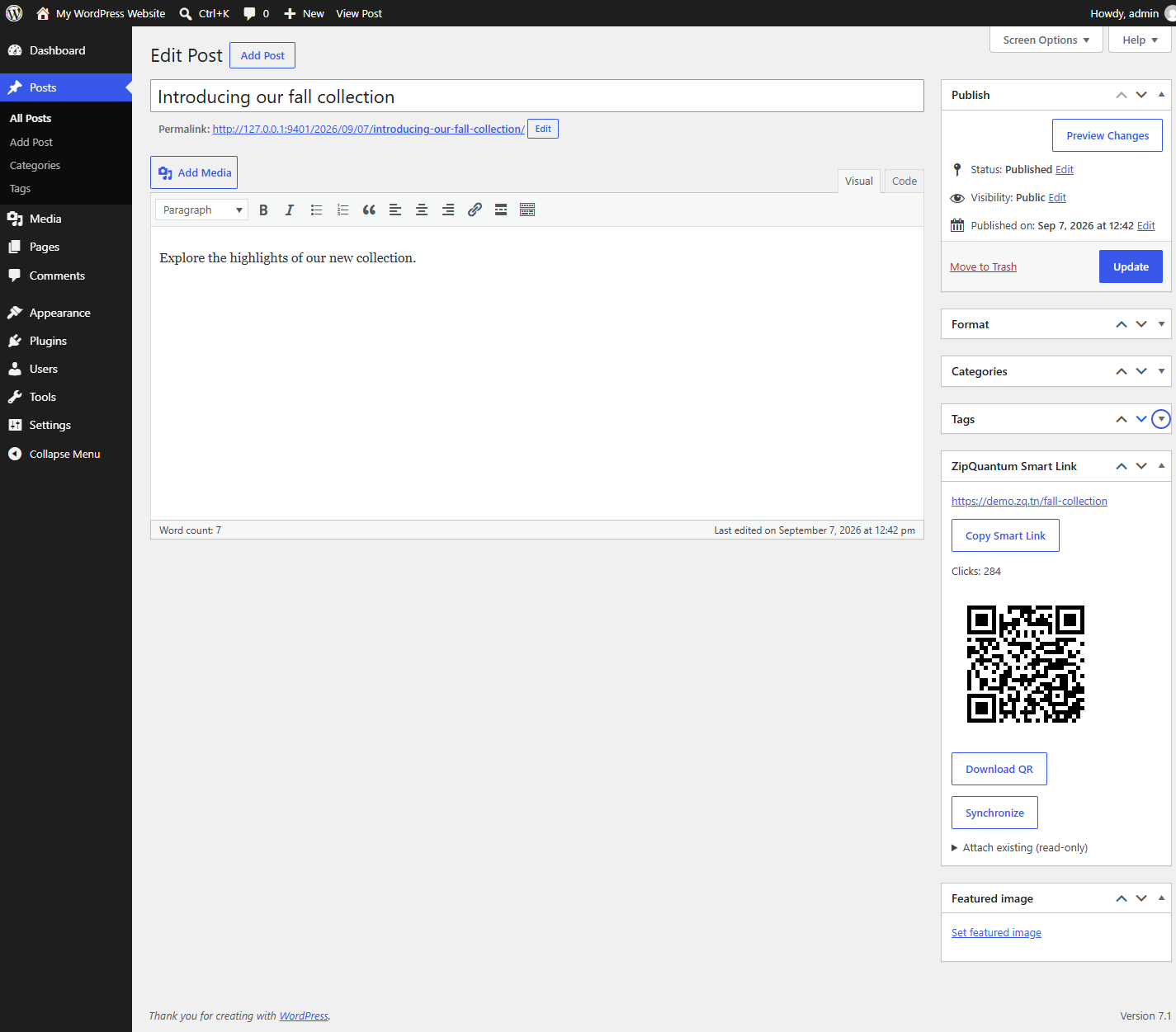
That visibility reduces handoffs without pretending that the CMS is a full attribution platform.
5. Treat QR codes as durable entry points
A QR code is not merely an image export. Once printed, it becomes a long-lived interface between a physical object and a digital destination.
Before downloading a code, verify:
- the encoded URL uses the intended branded or managed domain;
- the destination works on mobile web;
- any app route has a useful store or web fallback;
- the code is tested at the final physical size;
- sufficient quiet space and contrast are preserved;
- the destination owner and replacement process are documented.
QR Smart Codes let the QR use the same routing object as the shared link. That removes a common source of drift: a social link is corrected, but the separately generated QR code still points to the old destination.
For packaging, signage, events, and catalogs, test the exact exported file after it has been placed into the final design. A screenshot of a QR code inside a browser is not a print-quality asset.
6. Make bulk synchronization observable
Automation becomes risky when a team cannot see which objects succeeded, failed, or are waiting.
For bulk creation or synchronization, use a durable queue with explicit states. At minimum, operators should be able to distinguish pending work, active processing, completed objects, retryable failures, blocked work that needs a decision, and deliberately paused automation.
Retries must be idempotent: retrying one object should not create duplicate remote links. An operator should be able to retry a specific failure or resume a paused queue without republishing content.
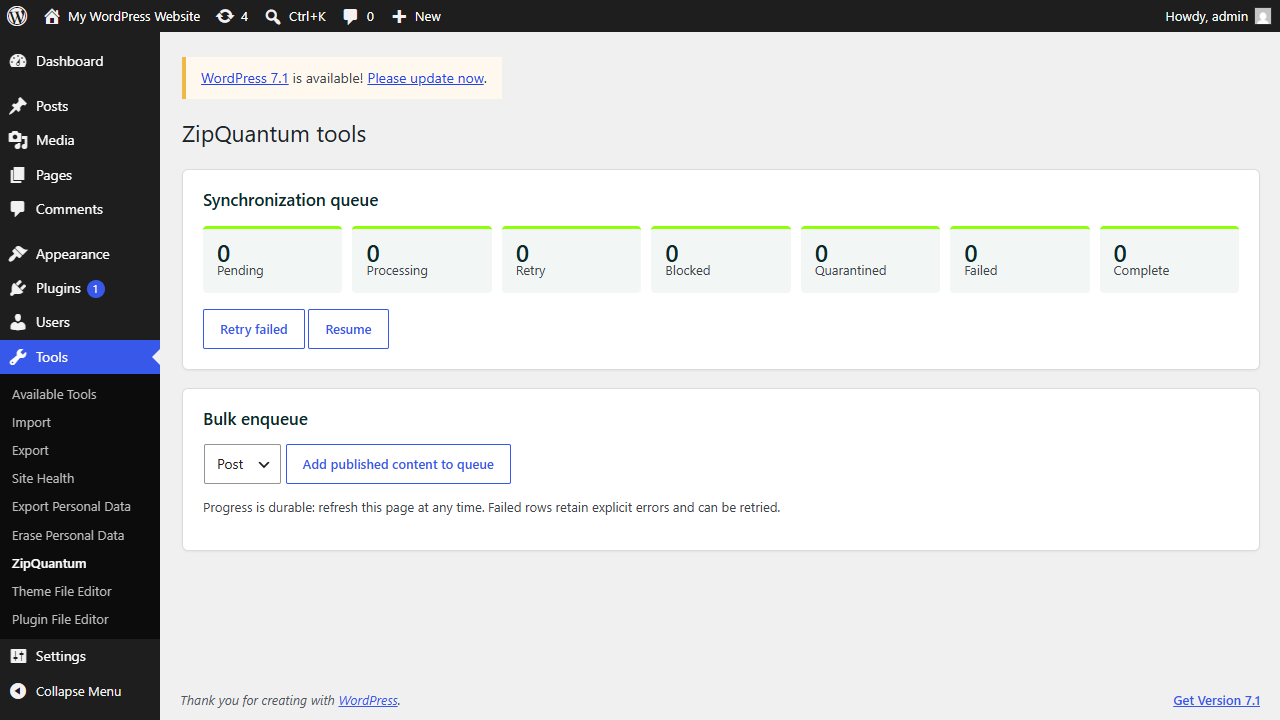
This matters most during migrations, seasonal catalog updates, and large product imports. A bulk action that reports only “done” can hide hundreds of partial failures.
7. Give WooCommerce objects distinct policies
Products, categories, and coupons should not share one generic rule.
| Object | Recommended policy | Verification |
|---|---|---|
| Product | Keep the public link stable; allow destination updates when the canonical product URL changes | Test in-stock, out-of-stock, and discontinued states |
| Product category | Use for durable collections, not temporary filters with unstable parameters | Confirm the collection remains meaningful after catalog changes |
| Coupon | Define eligibility, destination, start/end date, and fallback before distribution | Test valid, expired, exhausted, and ineligible states |
If your mobile app has matching product routes, also test the installed and not-installed paths. The broader mobile campaign journey audit provides a useful state matrix for app, store, mobile web, desktop, and in-app-browser behavior.
Do not let a link apply a discount or authorize a sensitive action by itself. The destination system must validate the coupon, account, geography, inventory, and time window server-side.
8. Measure operations without turning WordPress into a tracking layer
For many CMS workflows, simple link-level click totals are enough to answer operational questions: Is the printed QR code being used? Did the partner placement generate activity? Is an old campaign link still receiving traffic? Which content objects justify continued maintenance?
Those questions do not require a visitor SDK, device fingerprinting, advertising identifiers, or visitor analytics inside WordPress.
Keep link operations separate from user-level attribution. If a campaign needs full conversion measurement, define consent, identifiers, retention, and reconciliation in the appropriate analytics stack. Review ZipQuantum’s security and privacy model, no-fingerprinting approach, and data-resale policy before adding more data than the workflow needs.
9. Plan for deletion, uninstall, cloning, and migration
The difficult lifecycle questions appear after launch: What happens to the remote Smart Link when a WordPress object is deleted? Does uninstalling the plugin destroy live links? What happens when staging is cloned into production? Can a copied database control links belonging to the original site?
A safe default is conservative: deleting WordPress content or uninstalling a connector should not automatically delete remote links. Local association metadata can be removed separately when an administrator explicitly chooses to do so.
Site identity also matters. A clone or migration should stop synchronization when the installation identity no longer matches, then ask an administrator whether to move the existing installation, start a new one with quarantined local associations, or reconnect unchanged credentials.
This pause is not friction for its own sake. It prevents a staging clone from silently changing production campaign links.
10. A 15-minute launch checklist
- Confirm the ZipQuantum account is connected through the approved OAuth flow.
- Verify the managed subdomain or custom domain.
- Select only intended WordPress object types.
- Give existing links an owner and management mode.
- Test one post, one page, and one relevant commerce object end to end.
- Test copied links and downloaded QR codes in their final placements.
- Confirm failed synchronizations are visible and retryable.
- Review deletion and uninstall behavior.
- Prevent staging and production from writing to the same links accidentally.
- Match the privacy disclosure to the features actually enabled.
On WordPress Multisite, configure and connect the plugin separately for each site. Version 1.0 does not support network activation.
The official WordPress plugin is now available
The workflow above can now be run directly from WordPress with the approved ZipQuantum – Smart Links & QR Codes plugin, version 1.0.0.
It supports posts, pages, public custom post types, products, product categories, and coupons. Editors can create or synchronize managed links, attach existing links in read-only mode, copy Smart Links, download QR codes, inspect simple click totals, and operate the synchronization queue.
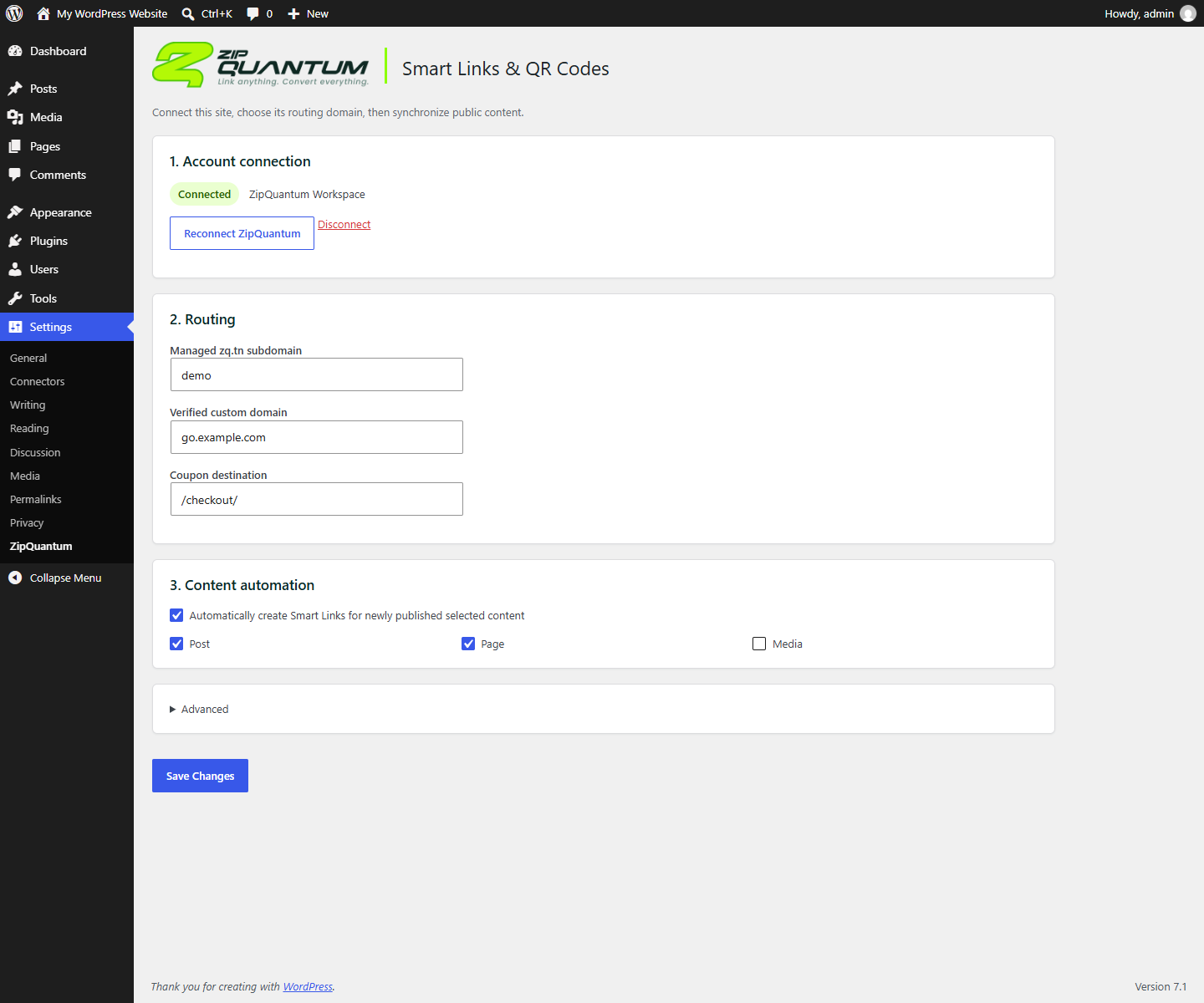
The plugin requires WordPress 6.9 or later and PHP 7.4 or later. WooCommerce support loads only when WooCommerce is active. A ZipQuantum account and the external service are required; a Free plan is available, and the plugin itself is not trialware.
The practical takeaway
The real improvement is not “adding a link button to WordPress.” It is reducing the distance between the content object, its public destination, its reusable distribution link, its QR asset, and the person responsible for keeping all of them correct.
Start with one object type and one channel. Define ownership, choose a management mode, test the final placement, and make failures observable. Automate only after that contract works.
Frequently asked questions
Does the plugin work without WooCommerce?
Yes. It works with WordPress alone. WooCommerce-specific support loads only when WooCommerce is active.
Does it add visitor tracking to WordPress?
No. The plugin does not add a visitor SDK, visitor fingerprinting, advertising identifiers, or WordPress visitor analytics. It can retrieve simple link-level click totals from ZipQuantum.
Does deleting content delete the remote Smart Link?
No. Removing WordPress content removes the local association metadata, but the remote Smart Link is not deleted automatically.
Should every post automatically get a Smart Link?
Not necessarily. Enable automatic creation only for object types with a defined owner, destination policy, and recurring distribution need. Manual creation is often better during the first operational rollout.
Can an existing Smart Link be connected to a WordPress object?
Yes. Use read-only attachment when the link already exists and another workflow owns its lifecycle. Use managed synchronization when WordPress should control the link association.