
ZipQuantum Engineering ·
How to Migrate from Firebase Dynamic Links in 2026
A practical migration plan for replacing retired Firebase Dynamic Links with stable HTTPS links, verified app routing, safe fallbacks, and measurable rollout stages.
Firebase Dynamic Links shut down on August 25, 2025. Links on page.link domains and Firebase-hosted custom domains no longer provide the routing behavior teams relied on. If those URLs still appear in emails, QR codes, paid campaigns, referral flows, or old app releases, migration is now a recovery project—not a future maintenance task.
This guide explains how to replace the routing layer without pretending that a new provider can revive an old Firebase URL. The goal is to inventory the journeys you still control, create stable replacement links, configure native platform associations, and move traffic in measurable stages.
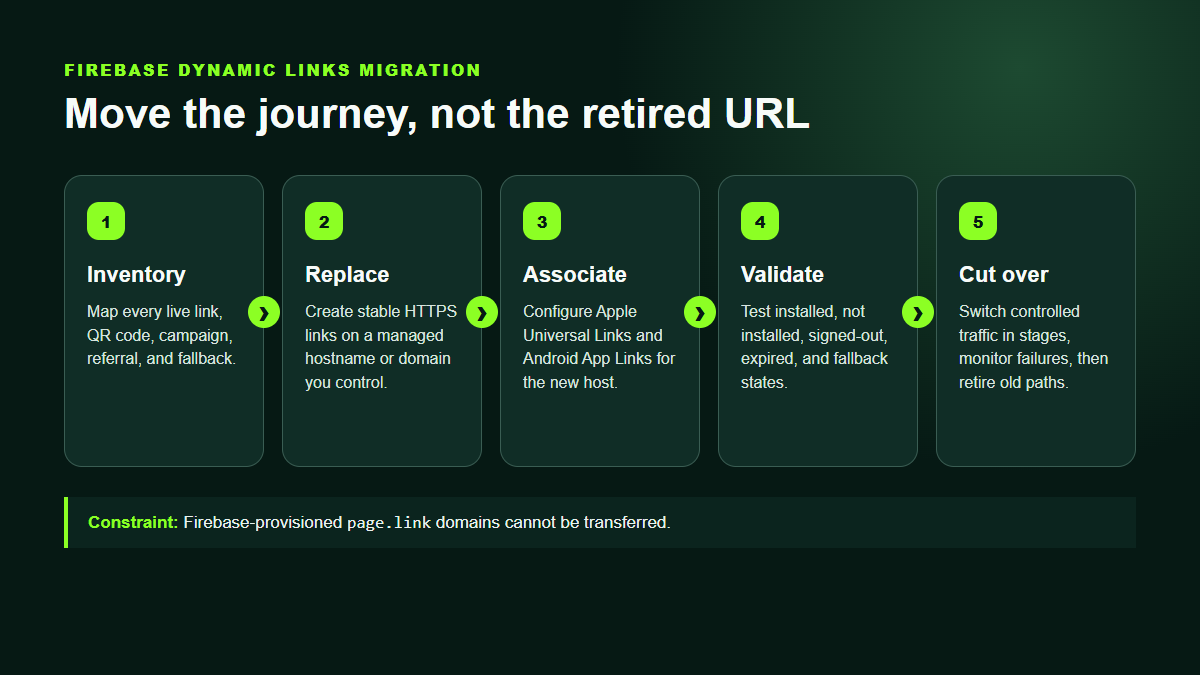
1. Inventory journeys, not just URLs
A spreadsheet containing only the old short URL and its destination is not enough. Dynamic links often encoded different behavior for Android, iOS, desktop, installed users, and users sent to a store. Capture the complete intent of every link before rebuilding it.
For each link, record:
- the old Firebase URL and every placement where it appears;
- the primary web destination;
- the Android package name and Google Play destination;
- the iOS bundle context and App Store destination;
- the intended in-app route and required parameters;
- desktop, unsupported-device, and expired-link fallbacks;
- campaign parameters, activation dates, expiration dates, and click limits;
- the business owner and priority of the journey.
Classify each journey as critical, active, long-tail, or obsolete. Authentication links and other Firebase features affected by the shutdown need a separate migration path; do not treat every Firebase URL as a marketing deep link.
2. Choose a URL namespace you can keep
Your new link domain becomes infrastructure. Choose it before recreating hundreds of links. ZipQuantum supports managed addresses in the form https://{subdomain}.zq.tn/{reference} and verified custom domains such as https://go.example.com/{reference}.
A managed ZipQuantum hostname is the fastest option for a pilot. A custom domain gives your organization direct control over branding and future continuity, but it also requires DNS ownership verification, TLS, and correct native association files. Whichever option you choose, keep the public path structure simple and avoid reusing references whose meaning has changed.
3. Map Firebase behavior to explicit ZipQuantum fields
Create one ZipQuantum Smart Link for each active journey and map only behavior that you can test. A Smart Link can contain a primary destination, device-specific targets, a fallback URL, Android and iOS store information, campaign parameters, lifecycle rules, and social-preview metadata.
| Migration concern | ZipQuantum configuration |
|---|---|
| Default web destination | Primary destination |
| Android store fallback | Android package and/or explicit fallback URL |
| iOS store fallback | Complete App Store URL and/or explicit fallback URL |
| Campaign context | Parameters such as utm_source, utm_medium, and utm_campaign |
| Scheduled or retired links | Activation time, expiration time, click limit, and expiration redirect |
| Sharing previews | Preview title, description, and HTTPS image |
Do not promise one-to-one feature parity. Rebuild the user outcome and document any deliberate difference. ZipQuantum uses deterministic, platform-specific handoffs rather than fingerprinting or probabilistic device matching.
4. Configure Universal Links and Android App Links
When the app is already installed, the operating system—not a JavaScript redirect trick—should decide whether the HTTPS URL opens your app. That requires a verified association between your link hostname and your production app.
- On iOS, add the hostname to the Associated Domains entitlement and serve a matching
apple-app-site-associationfile. - On Android, add an HTTPS intent filter with
android:autoVerify="true"and serve a matching/.well-known/assetlinks.jsonfile.
Every hostname used for app opening must be configured deliberately. Apple requires each associated subdomain to be listed and to serve its own association file. Android verifies the package name and SHA-256 certificate fingerprint; when Play App Signing is enabled, use the fingerprint Google applies to distributed releases.
ZipQuantum does not require a proprietary mobile SDK, but “no proprietary SDK” does not mean “no app setup.” Your app still needs a one-time native or framework-level handler for verified links and the routes it accepts.
5. Decide how post-install recovery should work
Installed deep linking and deferred deep linking are different states. If the app is absent, the store interrupts the journey. Recovering the original destination after installation requires an explicit platform handoff.
ZipQuantum’s current deterministic approach uses:
- Android: an opaque, signed, expiring token carried through Google Play Install Referrer and recovered on first open;
- iOS: a short-lived, signed, user-initiated handoff recovered after installation.
Neither flow depends on an advertising identifier, device fingerprint, or probabilistic match. Your application should validate the returned route and treat every URL parameter as untrusted input.
6. Run a migration matrix before changing traffic
Test every high-priority link across the states that matter:
- iOS with the app installed;
- iOS without the app, followed by installation and explicit recovery;
- Android with the app installed;
- Android without the app, installed from Google Play, then first open;
- desktop browser;
- unsupported mobile browser;
- expired, not-yet-active, and click-limited link;
- social preview and QR-code scan.
Verify both the destination and the parameters. A link that opens the correct app but loses the product ID is still broken.
7. Replace placements in controlled waves
Start with placements you can edit and observe: website buttons, current email templates, paid ads, active QR campaigns, and referral invitations. Move a small percentage first, watch redirects and downstream conversions, then expand. Keep a migration register containing the old URL, new URL, owner, change date, and validation result.
Historical printed materials and old application binaries may contain Firebase URLs you cannot update. Document that residual risk rather than hiding it. The shutdown means those original URLs cannot be repaired at the Firebase layer.
Common migration mistakes
- recreating only the destination and forgetting store or desktop fallbacks;
- publishing association files with the wrong production signing fingerprint;
- testing an Android deferred flow from a sideloaded build instead of Google Play;
- assuming a custom URL scheme provides the same verified ownership as Universal Links or App Links;
- putting secrets, email addresses, or personal identifiers in public link parameters;
- switching all campaigns before measuring a pilot cohort.
Start with one production journey
Choose a single high-value link, rebuild it, configure the hostname association, and validate all install states. Once that journey is reliable, use the same checklist for the rest of the inventory.
Create a ZipQuantum account or follow the Firebase migration documentation.